I once placed a market buy order on a thinly traded stock right at the open. I expected to pay roughly $12.50 per share — that was the last traded price. I paid $14.20. That's a 13.6% immediate loss before the stock even moved against me. All because I didn't understand the difference between order types. This guide could have saved me $340 in 30 seconds of education.
The Three Fundamental Order Types
Market Orders: Speed at Any Cost
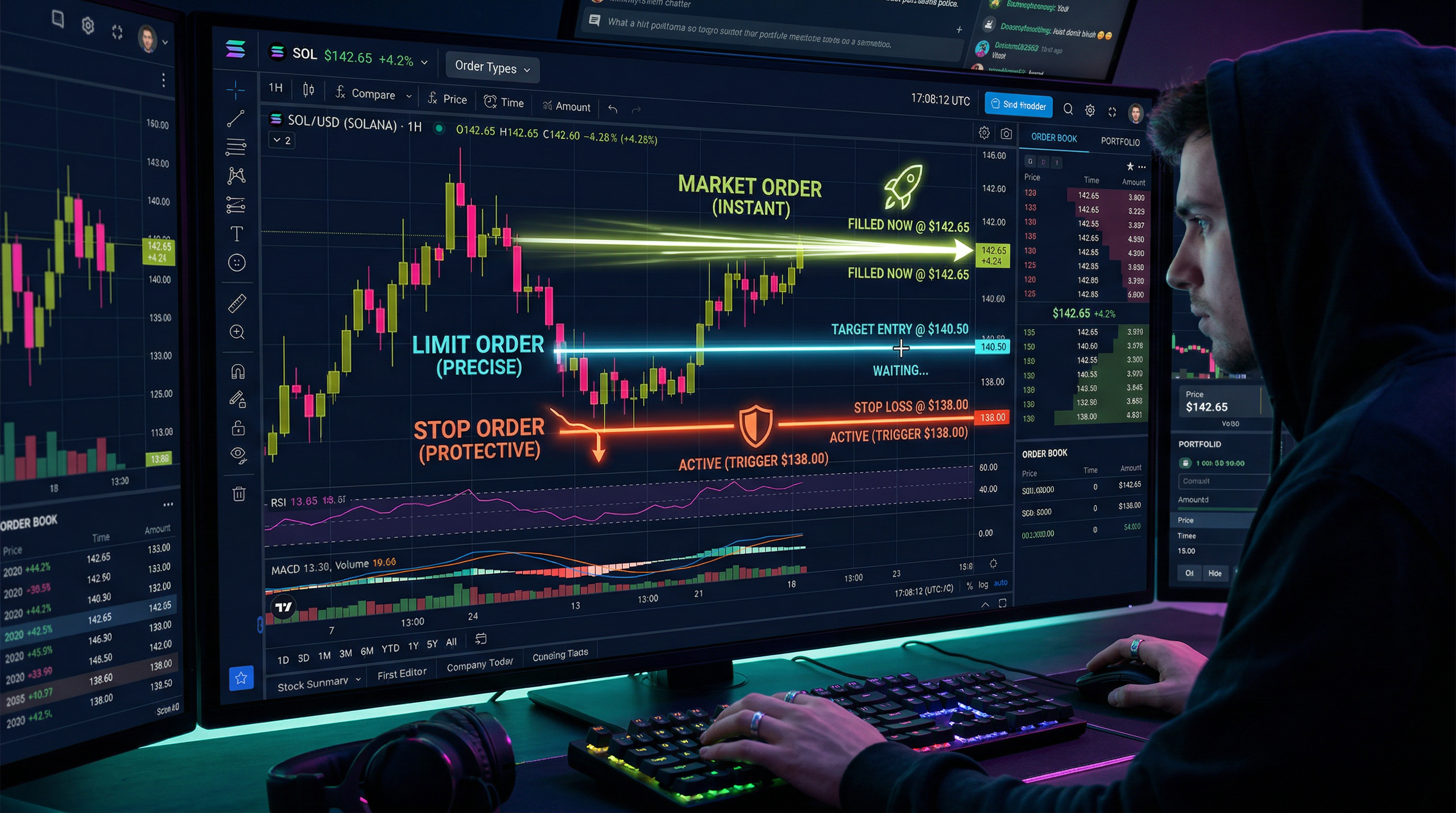
A market order buys or sells immediately at the best available current price. You get guaranteed execution but no guarantee on price. In highly liquid stocks like Apple or SPY during regular hours, the slippage (difference between expected and actual price) is usually tiny — $0.01–$0.05 per share. In illiquid stocks or fast-moving markets, it can be catastrophic (see my $14.20 story above).
When to use market orders: Only for highly liquid stocks (large caps with millions of daily volume) during regular market hours, when getting in or out quickly is more important than price precision. Urgent exits from a rapidly declining position. Never use market orders in pre/after hours sessions or on thinly traded stocks.
Limit Orders: Price Control, No Execution Guarantee
A limit order specifies the maximum price you'll pay (buy limit) or minimum price you'll accept (sell limit). The order only executes if the market reaches your specified price. You get price certainty but no execution guarantee — if the stock never hits your limit, the order never fills.
When to use limit orders: Almost always, especially as a beginner. Entry orders, exit orders with profit targets, stop-loss orders in illiquid conditions. The slight inconvenience of occasionally missing a trade because your limit wasn't reached is vastly preferable to the expensive slippage of market orders. Set limit orders on Traderise as your default order type.
Stop Orders: The Automated Safety Net
A stop order triggers a market order when the stop price is reached. A stop-loss is a sell stop order — when price falls to your stop level, it automatically sells your position. This creates guaranteed exit execution when your loss threshold is hit, without requiring you to watch the screen constantly.
When to use stop orders: For every position you hold. Non-negotiable. Your stop-loss IS your risk management. Without stop orders, you're manually managing risk — which fails in fast-moving markets where you can't react quickly enough.
Use limit orders for entries and profit-taking exits. Use stop-market orders for stop-losses on liquid stocks. Use stop-limit orders for stop-losses only on very liquid stocks where you're comfortable with the risk of the limit not filling. Set up all three types as paper trades on Traderise before using them with real money so you understand exactly how each behaves.
Advanced Order Types Worth Knowing
Stop-Limit Orders
A combination: when the stop price is triggered, instead of a market order, it places a limit order. This gives you more price control but introduces the risk of the order not executing in fast markets. Example: Stop at $47, limit at $46.50. If price gaps from $48 to $44, the stop triggers but the limit of $46.50 never gets hit — you're still in the position with no exit. Use stop-market orders for most stop-loss situations to guarantee you actually get out.
Trailing Stop Orders
A trailing stop automatically moves with the price as it rises, maintaining a set distance from the peak. As discussed in the stop-loss guide, this locks in gains while keeping the trade open during upward moves. Excellent for trend-following strategies.
OCO (One-Cancels-Other) Orders
An OCO order pairs a profit target with a stop-loss. When one fills, the other automatically cancels. This automates your complete exit strategy for a position — you can set it up, walk away, and know the position will close at either your profit target or stop, whichever comes first. Very useful for overnight swing trades.
GTC (Good Till Cancelled) vs. Day Orders
Day orders expire at the end of the trading day if not filled. GTC orders stay active until you cancel them or they execute. For swing trade entries waiting for a specific price pullback, GTC limit orders let you set the entry once and not have to re-enter it every morning.
Practice This Strategy Risk-Free
Traderise lets you paper trade with $10,000 in virtual funds using real market data. Test every strategy in this article before you risk a single real dollar.
Start Paper Trading FreeReal-World Order Type Scenarios
Scenario 1: Entering a swing trade — You want to buy Stock XYZ if it pulls back to $45. Set a GTC buy limit order at $45. If the stock reaches $45 tomorrow or next week, you fill at your target price without having to watch constantly.
Scenario 2: Setting a profit target and stop simultaneously — You're in a position at $50. Your target is $58, your stop is $47. Set an OCO order: sell limit at $58, sell stop at $47. The position manages itself.
Scenario 3: Selling in a fast market — Stock is crashing 5% per minute on major news. Use a market order to exit immediately — in this scenario, guaranteed execution beats price precision. Your stop should have already triggered, but if not, market order gets you out.
Practice all of these order types systematically on Traderise's paper trading platform. Understanding order mechanics in a consequence-free environment means the first time something unusual happens in a live trade, you'll know exactly what to do.
Master Every Order Type Before Going Live
Practice market orders, limit orders, stops, OCOs, and trailing stops on real market data with Traderise's paper trading. Eliminate order-type errors from your trading completely.
Try Traderise Free